Showing posts with label What is SketchUp. Show all posts

SketchUp in Home Building


I use SketchUp extensively during the construction of my new house. Almost for every aspect of the construction, from designing to supervising. Some of the applications are:

  • Grand Design.
  • Detailed Design and Technical Drawing
  • Interior Design.

Grand Design

I call it the Grand Design since I am planning to build the house in several stages to match with my budget. I need to have everything well planned so every stage will not look like unfinished building and no building material is wasted.

The grand design is the final stage of the construction. I myself designed the house layout down to the placement Grand Designof bathtub, toilet and walk in closet. To finalize the design, I ask a professional architect to give "the look" of the house by designing the roof and the façade. The architect also provides my with a better main stair placement so it is not only functional but it also blends with the interior nicely.

The architect provide me with 3D design of the house but only in hardcopy, or pdf of the hardcopy. To have thorough understanding of all designs submitted by the architect, I always make a SkecthUp model of every design and send it to with comment to the architect (if a picture is better than a thousand words, than 3D model at least 1001 times better right ..). Therefore, consultations can be done mostly by email since not much verbal communication is required. At the end of the consultation, Architect send me some 2-D AutoCAD files. This is the final input to the Grand Design.

Structural Design and Dividing the construction into several Stages

Based on the Grand Design, I ask a civil engineer to design the proper structure of the house. The structural design is required not only for obtaining building permits, but it also required to find alternatives on how to split the construction into several stages.
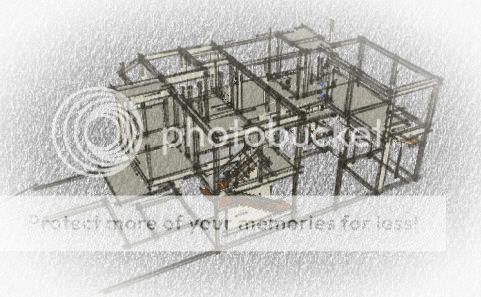
StrukturFrom the structural design, it is determined that the house will be built in three stages. All structure that must be build at the first stage is identified in order not to compromise overall structure of the final design.

Detailed Design and Technical Drawing

I prepare detailed designs and technical drawings for almost all aspects of the house construction. From detailed size of windows, doors, and architrave, placement of toiletries, to detailed design of staircases; even to the laying of tiles.

Tangga

All of the detailed design and technical drawing is made as detailed and as accurate as possible. Some manufactures, such as Grohe and Grundfos, have already provided 3-D models in CAD formats for some of their products. They can be imported into SketchUp version 6.x/7.0.  Some manufactures, such as Kohler, have already provided SketchUp models of their products in Google 3d Warehouse.

Try Googling what you need or you can always make them on your own. The staircase above is a made according to specification from a handrail producer in Indonesia that I plan to use.

SketchUp has the ability to simulate the movement of the sun for every minute of the day to study how the shadow fall to your building specific location. This is very handy to design how to get most out of the sunlight to your building and to keep away heat (this is important in tropical countries such as Indonesia) by adding plantation at specific locations or adding shade to Windows.

Plumbing Design

I myself design the plumbing system. There are four groups of water piping: (a) water that goes straight up to a water reservoir system installed on a roof platform. (b) cold water to supply water from the reservoir system for all toilets and all the first floor water installation, (c) pressurized cold water and (d) hot water (trough a booster pump) for two main bathrooms. A looping pipe design is use to maintain pressure of the hot water supply. Plumbing

Sound complicated? Not really, because I use 3skeng pluggin (free version, valid until April 2010). From the design I can determine all the piping accessories. The focus is on pressurized water piping that use relatively more expensive PEX pipes.

Determining Electrical Switches & Receptacles .

Electrical design and installation is done by designated experts. What I make is just detailed drawing the location of all points for lamps, switches, receptacles and other electrical equipment. Hopefully no extension cord will ever be used in the house since to the receptacles of each room is pretty much in accordance with the IEE recommendations. From the drawing, electrical installations is designed and installed by experts.

ElectricalI use Panasonic for switches and receptacles. This manufacturer sells their product as parts that can be self assembled according to your specification I define function for each switch and outlet and made SketchUp components based on relevant product part numbers. SketchUp can list all the part numbers and their quantity for your Shopping Lists.

Laying Out Tiles and Parquets

In order to have the highest efficiency for floor covering while maintaining good design, all floor covering are modeled in details. Before buying any of the of tiles, I make a detailed measurement of the room and the tile and create a SkecthUp model for the specific room floor.

TilingI use dynamic components obtained from the Google 3D Warehouse. So designing the laying of tiles and parquets are quite easy.

The illustration shows the laying of 60x60cm tiles for my daughter bedroom. From the this model, I can calculate the number of tiles required and which part of the design that are more prone to damages due to cutting. So I can allocate some tiles for spare and avoid buying more than required.

Technical Drawing

For fieldwork, I prepare technical drawing of each of design. It requires some getting used to for the field supervisor to work with 3-D drawings. However, with a little explanation, this obstacles can be easily removed.

Some technical drawing is also be done in 2-dimension like those produced by architects (Especially for works that is done by third parties.)

Interior Design

LivingI also use SketchUp to make some interior design such as: bedroom, bathroom, living room and kitchen, including kitchen and bathroom cabinets.

The following picture is one example of the interior aspect I created then rendered using Kerkhythea.

There are many more aspects of home building that I do with SketchUp. It is more than likely that you will be able to do the same by learning from this blog. Trust me. But beware, it's addictive.

Harrynov


Getting to know Sketchup Free


What is SketchUp

Sketchup is a computer software to create 3D models (3-D) of physical objects such as buildings, home appliances, landscapes, to name a few. Architectural design is one of the applications of SketchUp.

Before Google Building Maker, SketchUp was the only software that is used to make 3-D buildings that you see on Google Earth.

Recommendation
Want to see some example of Sketchup models? What about thousands of them. You can visit:
3DWH
to see thousands of examples of 3-D models that have been made by individuals and companies. Everything can be downloaded for free.

Actually, Some 3-D modeling softwares have been around long before SketchUp, particularly those that are developed for professionals such as Autodesk 3ds Max, ArchiCAD, or those that are specifically targeted at  home owners such as Punch Home and Landscape Design.

Before I was aware of SketchUp, I tried 3ds Max and found out that it required a certain power of Graphic Cards (GPU) to run. Since this has been always just for a hobby, I stopped trying any of those serious 3d modeling softwares.

Of course, each has its own advantages and disadvantages. Some are not even comparable with Sketchup in term of sophistication. But all of the above are paid softwares. Google offers us with a free SketchUp. This definitely put more weight to our consideration to make SketchUp as our weapon of choice.

Why SketchUp?

Kenapa harus Sketchup sih? Bukannya ada yang lebih bagus?
Yang lebih mahal ....... banyak!
It is Surprisingly Easy

What makes it stand out compared to other 3D modeling softwares is  SketchUp modeling is accomplished by tools and techniques that are very intuitive to use. It is almost like dealing with real physical objects, but without physical barriers. No formula to remember, no parameters to enter (We will talk about this later in this tutorial).

Modeling in SketchUp is more like 'molding' than 'constructing'. For example, if you want to raise the height of an object to match the height of another object, simply select a surface and then pull it up to the same height with the other object. 

Easy Modeling
 It's soooooo easy

Wanting to make a hole on a surface, just create a circle on the surface and push down its inner face as deep as you want, or pull it up, if you want a cylinder shape protruding from the surface.

Lots of activities can be accomplished merely by mouse clicks and drags, yet the results can still be accurate. (More details see here: Improving Model Accuracy)

With such ease of use, we can concentrate more on designing and turning our creativity into our model efficiently ... and having fun while doing it.

Which is often considered as a challenge for new SketchUp users is that everything has to be built  from scratch: line (edges) and polygons (faces). In contrast, some home architecture softwares provide you with objects like walls, columns etc.  None is available in SketchUp. This was very confusing when I first tried SketchUp to model a house.  This tutorial will show you that such challenge is very easy to overcome.

And lucky for us, we don't always need to build everything from scratch because there are a lot of good Samaritans out there that provide us with ready for use 3d models, from a chair to an airplane, to add to our model for free.

Almost like Air, It is Free.

Google provides a free version of SketchUp which can be downloaded from the Internet. The software is absolutely free, so you don't need to fear of  being raided by the policy for using pirated software.

After SketchUp being acquired from @Last Software, Google released a free version of SketchUp, along with the Pro version. Please note that Google does not restrict the use of Sketchup. There used to be a clause that "you can use Google SketchUp for your personal and commercial use" but it seems to have disappeared from the TOS. Therefore, my personal interpretation, it still can be used for any purpose, including for commercial purposes. For a hobby - in my opinion - we don't need SketchUp Pro. (For more details see the difference at this link).

Some noticeable differences are:  In SketchUp (Free), we can not easily make  scalable printout like those produced by architects, and the free version has no ability to export (and import, starting from version 7.1)  from/to standard CAD formats like .dwg or 3ds. Things that we can live without.

In summary, to create models like those we want to accomplish in this tutorial, what can be done by SketchUp Pro, can be also done by SketchUp Free.

Notice that Sketchup Pro is a trialware, in the sense that it will work as a fully functional Sketchup professional  version for 8 working hours and will turn into a free version after the 8-hour expires.

It is Ridiculously Good with Endless Possibility (.. sort of)

Of course "free" is not always a good reason enough for us to choose anything. If you notice, some (Indonesian) national magazines/tabloid that discuss home construction/renovation use SketchUp to model houses discussed in their publications.  The results are very good and can be quite accurate to a few points behind a coma (That is in millimeters!).

Another uniqueness of Sketchup is its openness. Google provides programming interfaces (APIs) so anybody can write a script (a relatively simple programming language) to do things from a simple task to a quite complicated operation as shown on this youtube video.

Surely you don't need to do this because many of such scripts (aka. plugins) are free. As we can see at Orbit,  at Smustard.com™, there are lots of free plugins.

KerkytheaAnother aspect of 3d modeling is the output. With the help of rendering softwares, you can produce photo realistic pictures of your model. The limit is your artistic sense and the speed of graphics processor you have (and / or a lot of waiting). Because rendering software can take hours, even days, to finish, depending on complexity of your model, textures and light setting. Free rendering software that I sometime use is Kerkythea. Visit their site to see amazing examples how you can make your SketchUp model into photo realistic pictures.

It is Pleasantly Light on Your Hardware

SketchUp does not require very sophisticated hardware specification, unless you want to create complex 3-D model (High poly). For a two-story house with 4 rooms, a regular notebook with 1GB of memory is sufficient. (Aren't we all 'weekend architects " in this category?).

Details about hardware and software requirements can be read in the Chapter: Prepare Yourself.

What is a SketchUp 3-D Model?

A SketchUp 3d model is basically a set of polygons (edges and faces) 'stitched' meticulously to look like solid objects. So is with Circle or Curve. Both are really just lots of small identical straight lines arranged to appear like a Circle or an Arc.

Tips and Trick
Scale of SketchUp Model
SketchUp models are always made with a 1:1 scale to its original size. Sometimes a modeler make bigger scale than the original. This is usually done for a model with high complexity and / or very small. SketchUp is not accurate enough to create intricate models with a size of few millimeters / centimeters only.

A block of wood is composed from six square-shaped polygons attached to each other and painted with wood pattern. A ball is composed of many polygons of different shapes with each edge is hidden to appear like having smooth curves. The more polygon we use (high poly), the more realistic models will look, but also more burdensome to the processor and graphics card.

There is no point in Sketchup, literally. Sketchup only recognizes edges and faces. Edges/Line will forms the boundary and faces make the surface of a polygon.

Sketchup version 8 introduces solid objects. A Sketchup solid is any 3d model (component or group) that has a finite closed volume. A SketchUp solid cannot have any leaks (missing faces or faces that do not meet at an edge). However, Sketchup free does not allow you to manipulate such objects, so this concept and its associated tools will not be discussed in this tutorial.

What SketchUp is Not.

Most people will not classify SketchUp as a CAD (Computer-Aided Design) software used for modeling 2-D / 3-D that demand for high level of accuracy. SketchUp is very clumsy for 2D-modeling.

SketchUp basic purpose is for making 3-D models quickly (sketching) and relatively accurate. SketchUp is not to create organic models such as the human body. (However, there are plugins that can help us create organic shapes such like this).

Most of house 3d-models are formed by regular shaped objects like rectangles, blocks, cylinders, curved profiles. Those are things that can be done in SketchUp easily. Because our topic is to model a house. we can definitely stick to SketchUp.

Happy Sketching

Harrynov
